HDEXT50M: 1080p HDMI Over One Cat6 Cable, Powered by PoC
HDEXT50M sends 1080p@60Hz HDMI up to 50m/164ft over one CAT6/6a cable, with one-way PoC powering the receiver and bi-directional IR control.


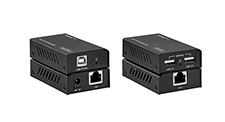 EXT-USB250M
USB 2.0 Extender over Cat6 50 Meters
480Mbps Plug-and-Play Extension to 164ft for Webcams, Printers & HID Devices — No Drivers…
Product page →
EXT-USB250M
USB 2.0 Extender over Cat6 50 Meters
480Mbps Plug-and-Play Extension to 164ft for Webcams, Printers & HID Devices — No Drivers…
Product page →
The EXT-USB250M is a transmitter and receiver pair. It carries USB 2.0 at up to 480Mbps over a single Cat5e/6 cable for 50m / 164ft, and gives you two USB-A ports at the far end. It is plug and play with no drivers to install. Integrators use it to put webcams, touch screens, printers and HID devices at a display or lectern that is too far from the host PC for a normal USB cable, in smaller conference rooms, classrooms and digital signage.
Applies to: EXT-USB250M USB 2.0 Extender over Cat6 50 Meters
It extends a USB 2.0 connection from a host PC to peripherals in another part of the room. The transmitter connects to the PC through its USB-B port and sends the signal out of an RJ45 port. The receiver takes the Cat5e/6 cable on its own RJ45 port and provides two USB-A outputs. The operating system sees the peripherals as if they were plugged in locally, so there are no drivers to install and nothing to set up. It supports the USB 2.0 protocol at up to 480Mbps and also works with USB 1.1 devices.
The maximum distance is 50m / 164ft over Cat5e/6 cable for most USB 2.0 devices. The exception is a USB 2.0 hub connected at the receiver: some hubs are limited to 40m/131ft. If you plan to put a hub at the far end, design the cable run to that shorter limit.
KanexPro lists webcams, printers, touch screens, keyboards, mice and USB hubs as devices for the receiver's two USB-A ports. These are USB 2.0 peripherals and HID devices. USB 1.1 devices are also supported at their native speed. The facts for this product do not list specific device classes beyond these, so if you are planning around a less common USB peripheral, test that device on the link before you specify it.
Yes. Plug a USB 2.0 hub into one of the receiver's USB-A ports to add more devices. With a hub in the chain, keep the cable run within the 40m/131ft limit that applies to some USB 2.0 hubs.
No, only the receiver does. The transmitter takes its power from the host PC through the USB-B port, so the PC end needs no adapter. The receiver runs on the included DC 5V/1A adapter, which accepts AC 100–240V 50/60Hz. A green POWER LED on each unit lights when that unit has power.
Yes. The extender runs over Cat5e, Cat6 and Cat6a cable, up to the 50m / 164ft limit. Connect CAT OUT on the transmitter to CAT IN on the receiver.
The box contains the transmitter, the receiver, a 1m USB cable (USB-B male to USB-A male) for connecting the transmitter to the PC, the 5V/1A power adapter and a user manual. Both units have black metal housings, and the set has a KanexPro 3-Year Parts and Labor Warranty.
| USB Protocol | USB 2.0 |
| Transmission Rate | Up to 480Mbps |
| Transmission Distance | 50m / 164ft over Cat5e/6 (Note: up to 40m for some USB 2.0 hubs) |
| Transmitter connections | 1x USB [USB-B, Female] input; 1x CAT [RJ45, Female] output |
| Receiver connections | 1x CAT [RJ45, Female] input; 2x USB [USB-A, Female] output |
| Power Supply | TX: Bus-powered (USB-B) · RX: Input AC 100–240V 50/60Hz, Output DC 5V/1A |
| Power Consumption | Transmitter: 0.7W · Receiver: 1W |
| ESD Protection | ±8kV Air-gap discharge, ±4kV Contact discharge |
| Dimensions | TX / RX: 82mm (W) × 49mm (D) × 20mm (H) |
| Weight | TX / RX: 100g each |
| Operating Temp | 0°C – 40°C / 32°F – 104°F |
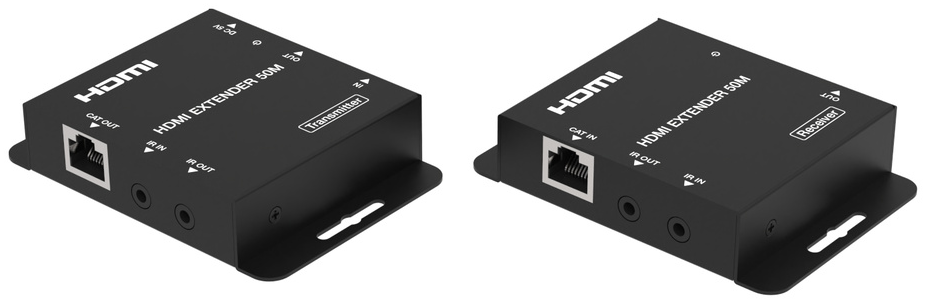
HDEXT50M sends 1080p@60Hz HDMI up to 50m/164ft over one CAT6/6a cable, with one-way PoC powering the receiver and bi-directional IR control.
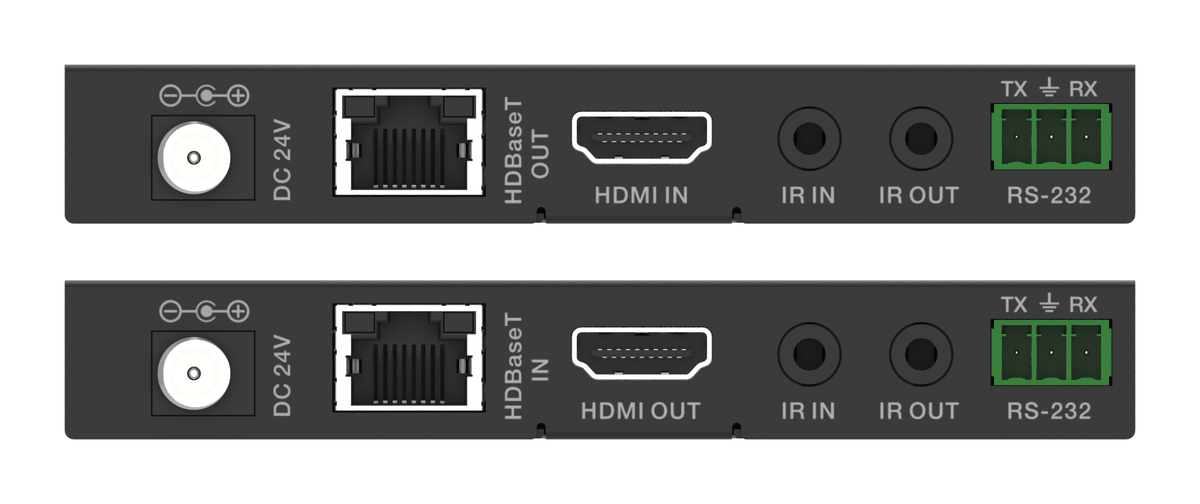
An HDBaseT kit that sends 18Gbps HDMI, IR and RS-232 over one CAT6, with one 24V adaptor at either end powering the transmitter and receiver.
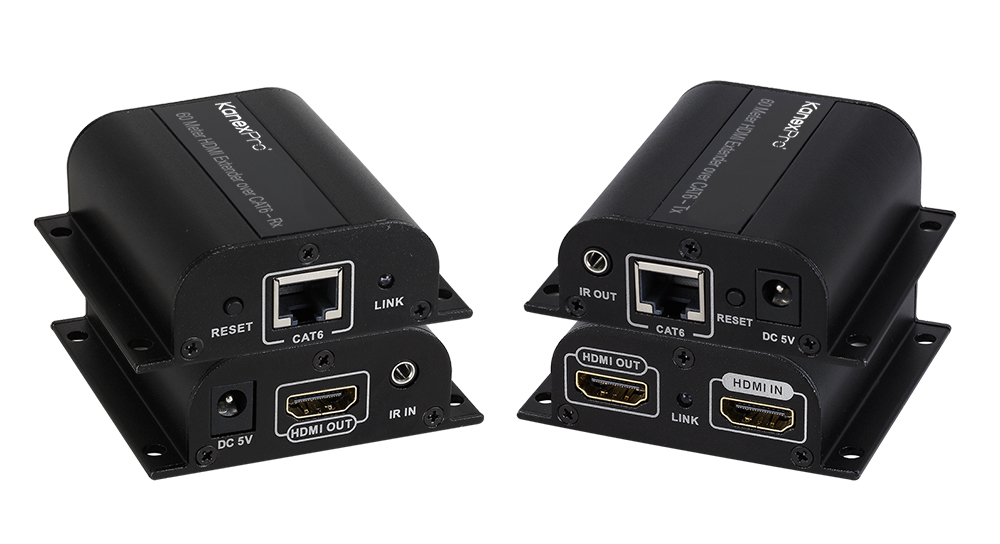
The EXT-HD60M sends 1080p@60Hz HDMI and IR up to 60m (196ft) over one CAT6/6a/7 cable, with a local HDMI loop-out on the transmitter. CAT5e won't…
KanexPro sells direct to dealers, resellers, installers and integrators, and through distribution. Whichever way you buy, the same engineers answer the phone.
The trade store: your own account, live stock, reordering, and a first look at new products.
Go to the trade store →Distribution and authorised resellers across the US and beyond.
See where to buy →Design help on extenders, matrix and AV over IP before you spec it.
Ask an engineer →