Control the MMX-8X8CAT-150M and MMX-4X4CAT-150M from Q-SYS
Add the Q-SYS plugin for the MMX-8X8CAT-150M and MMX-4X4CAT-150M: download, install, IP and TCP 8000 setup, and what each control does.

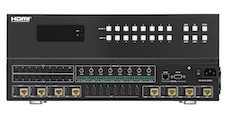 MMX-8X8CAT-150M
8×8 HDBaseT Matrix Switcher with 8 PoC Receivers – 4K60 to 120m (394ft), 1080p to…
18Gbps HDMI 2.0b 8×8 Matrix with Mirrored HDMI + HDBaseT Outputs, Audio De-embedding & Web GUI
Product page →
The MMX-8X8CAT and MMX-4X4CAT HDMI matrices send each output over CAT cable to an HDBaseT receiver at the display. This guide is for integrators who need to turn those displays on and off, or send them other commands, from a control system.
Applies to: MMX-8X8CAT-150M, MMX-4X4CAT-150M, MMX-8X8CAT-70M and MMX-4X4CAT-70M.
The MMX-8X8CAT-150M and MMX-4X4CAT-150M. Each of their HDBaseT receivers has a 3-pin RS-232 port that sends serial commands to the display beside it. The MMX-8X8CAT-70M and MMX-4X4CAT-70M receivers have no RS-232 port.
Connect the receiver's 3-pin RS-232 port (TX, RX, GND) to the display's RS-232 input. The control system talks only to the matrix, over TCP port 8000 or the matrix's rear RS-232 port, and every command ends with an exclamation mark.
s uart N baudrate y!, where N is the output (0 for all) and y=7 is 9600 baud (y=1, 115200, is the default).s uart N datalen 1! and no parity with s uart N parity 1!. r uart status N! reads the settings back.s uart N type 1 senddata, the command in hex, then end!. Use type 0 for a command in ASCII text.For example, Samsung MDC power on for display ID 1 on output 3 at 9600 baud: s uart 3 baudrate 7!, then s uart 3 type 1 senddata AA 11 01 01 01 14 end!. If the hex is not accepted with spaces between the bytes, send it without spaces. Test with one display before rolling out to all.
Yes, if the displays support HDMI CEC. On the MMX-8X8CAT-150M and MMX-4X4CAT-150M, s cec hdbt out y on! and s cec hdbt out y off! turn the display on receiver y on or off, with no RS-232 wiring. On the MMX-8X8CAT-70M and MMX-4X4CAT-70M, use the matrix's CEC control or RelayAV's display control.
In the RS-232 Control Commands section of each model's user manual, on its product page.

Add the Q-SYS plugin for the MMX-8X8CAT-150M and MMX-4X4CAT-150M: download, install, IP and TCP 8000 setup, and what each control does.

The MMX-8X8AUD product page has a Demo button: a simulated 8x8 matrix in your browser. Route by dragging, see which sources have a picture, use each…

The MMX-16X16AUD product page has a Demo button: a simulated 16x16 matrix in your browser. Route by dragging, see which sources have a picture, use…
KanexPro sells direct to dealers, resellers, installers and integrators, and through distribution. Whichever way you buy, the same engineers answer the phone.
The trade store: your own account, live stock, reordering, and a first look at new products.
Go to the trade store →Distribution and authorised resellers across the US and beyond.
See where to buy →Design help on extenders, matrix and AV over IP before you spec it.
Ask an engineer →