

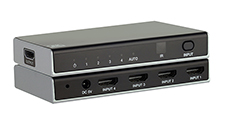
The SW-4X18K switches four HDMI 2.1 sources to one display. It carries up to 8K@60Hz 4:4:4 and 4K@120Hz 4:4:4 10-bit over 48Gbps of bandwidth, and passes HDR and HDCP 2.3. Use it where several high-resolution or high-frame-rate sources share one screen, such as a game console, a streaming player, a Blu-ray player and a cable box. You choose the input from the front panel or the IR remote, or let the switcher choose automatically.
Applies to: SW-4X18K 8K 4×1 HDMI 2.1 Switcher.
What does the SW-4X18K do?
It has four HDMI inputs and one HDMI output, all Type A, and is compliant with HDMI 2.1 and HDCP 2.3. A built-in equalizer and driver keep the signal clean through the switch. The plastic enclosure measures 122mm (W) × 65mm (D) × 19mm (H) and weighs 88g. It runs from the included 5V/1A power supply and draws 3.4W at most. The box also contains an IR remote and a user manual. The manual recommends surge protection because the unit has sensitive electrical components.
Which video and audio formats does it pass?
Supported video modes are 8K@60Hz 4:4:4 8/10/12bit, 8K@60Hz 4:2:0 12-bit, 8K@30Hz 4:4:4 10-bit and 4K@120Hz 4:4:4 10-bit. Colour spaces are RGB, YCbCr 4:4:4 / 4:2:2 and YUV 4:2:0, at 8/10/12-bit colour depth. HDR, HDR10, HDR10+, Dolby Vision and HLG pass through. Audio travels only inside the HDMI signal and covers LPCM 7.1CH, Dolby Digital/Plus/EX, Dolby TrueHD, DTS, DTS-HD Master Audio and DSD. The switcher cannot split audio out to a separate output (de-embedding). If you need a separate audio output, use the SW-4X1HDAUD or the SW-2X1A8K.
Can it be used for 4K@120Hz gaming?
Yes. VRR, ALLM and FVA are supported at 4K@120Hz 4:4:4 10-bit, so a console's variable refresh rate and auto low-latency mode reach the display through the switcher.
How are inputs selected?
On the front panel, a short press of the INPUT button steps through the inputs. A 3-second press turns on auto-switch, and the Auto LED lights white. In auto mode the switcher selects an active source on its own. On the IR remote, IN1–IN4 select an input directly and Cycle steps through them. Aim the remote at the IR window on the front panel. The input LED of the selected source lights white, and the Power LED lights green whenever the unit has power.
Does it have RS-232 or manual EDID control?
No. You control it from the front panel and the IR remote only. If you need serial control, use the SW-4X1HDAUD. EDID is managed automatically, and there are no EDID DIP switches. If you need manual EDID control, use the SW-2X1A8K or the SW-2X28K.
Why does one source work but another shows no picture?
If one source works on every input and another doesn't, check these in order:
- Select the failing input and confirm that its LED lights white.
- Check that the source's cable is the right type and length for the resolution that source sends.
- Check that the source's output resolution is one the display supports.
If you still have no picture, power-cycle the switcher.
Why does the picture drop out only at the highest resolutions?
For 8K60 or 4K120, every cable in the path must be Ultra High Speed HDMI and no longer than 6.6 ft (2m). If the picture still drops out or flickers, turn the switcher off and on again.
Why is the display showing a different source than expected?
Check which input LED is lit. If the Auto LED is also lit, auto-switch is choosing the source. Either power off the sources you aren't using, or select the input directly with IN1–IN4 on the remote. If auto-switch doesn't pick up a newly connected source, hold INPUT for 3 seconds until the Auto LED lights. Also make sure the inactive sources are powered off.
What if the remote or the LEDs don't respond?
If the remote doesn't work, aim it at the IR window, replace its battery and check for IR interference from other devices. If no front-panel LED lights at all, check three things: that the supplied 5V/1A supply is firmly in the DC 5V port, that its outlet is live, and then power-cycle the unit.
Key specifications
| Specification | SW-4X18K |
|---|---|
| HDMI / HDCP | HDMI 2.1 / HDCP 2.3 |
| Video Bandwidth | 48Gbps |
| Video Resolution | Up to 8K@60Hz 4:4:4 8/10/12bit, 8K@60Hz 4:2:0 12-bit, 8K@30Hz 4:4:4 10-bit, 4K@120Hz 4:4:4 10-bit |
| Color Depth | 8/10/12-bit |
| Input | 4 × HDMI IN [Type A, 19-pin female] |
| Output | 1 × HDMI OUT [Type A, 19-pin female] |
| Power Supply | Input: AC 100–240V 50/60Hz, Output: DC 5V/1A (CE/FCC/UL certified) |
| Power Consumption | 3.4W (Max) |
| Dimensions | 122mm (W) × 65mm (D) × 19mm (H) |
| Weight | 88g |
| Operating Temperature | 0°C – 40°C / 32°F – 104°F |