De-embed Zone Audio at the HDMI Matrix Switcher, Not Per Display
Pull audio for amps and soundbars from the matrix outputs, not from an extractor box behind each screen. Fewer boxes, fewer handshakes to debug.


In a gaming theater, an esports room or a mixed-resolution commercial install, the room almost never has one class of display. A reference screen may accept 8K, while a second screen, an overflow panel or a bank of spectator monitors still tops out at 4K or 1080p. Feed all of them from a single source layer and the lowest-capability sink tends to dictate what everyone sees, or a display simply drops to black when it is handed a signal it cannot parse.
High-refresh gaming makes this sharper. Variable refresh rate and auto low-latency mode only help if they survive the routing path intact, and the moment a switch cannot carry the full HDMI 2.1 bandwidth, 4K120 4:4:4 quietly becomes something less. Integrators end up bolting a separate scaler into the rack for each odd display, which adds boxes, power and another point of failure.
Audio adds a second axis. The processor or zone amp often needs its own feed, independent of where the video is routed, and de-embedding it cleanly from an 8K path is not something every matrix does.
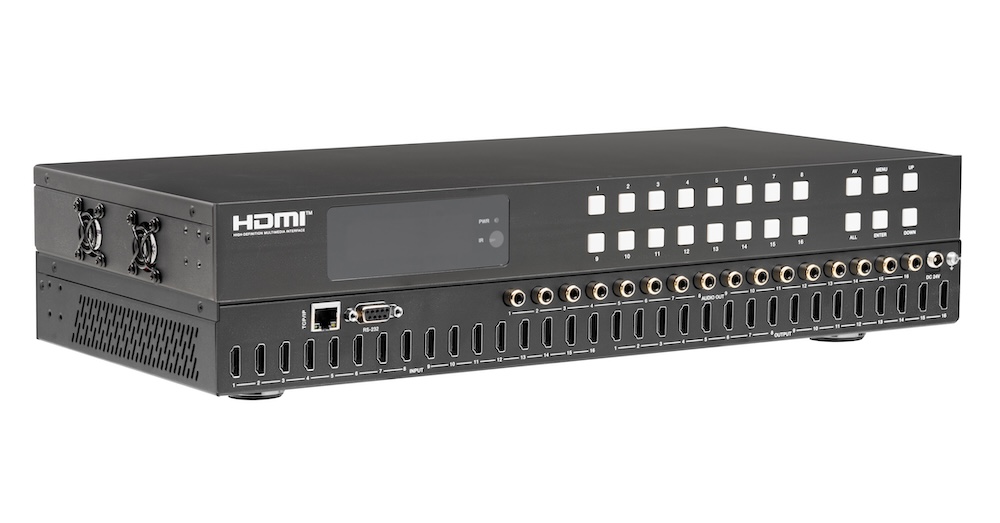
The MMX-4X4-48G is a 1U, all-metal 4×4 HDMI 2.1 matrix that carries the full 48Gbps bandwidth to all four outputs. It is rated up to 8K60Hz 4:2:0, 8K30Hz 4:4:4 and 4K120Hz 4:4:4, at 8, 10 or 12-bit color depth, and it is HDCP 2.3 compliant. Any of the four HDMI inputs routes independently to any of the four HDMI outputs.
The change that matters for mixed rooms is per-output processing: each output does its own resolution downscaling and HDR conversion, so an 8K reference screen and a legacy 4K or 1080p display can share the same routing fabric without a separate scaler in the rack. Every output also carries the complete gaming feature set — VRR, ALLM, QMS, QFT and SBTM — with HDR, HDR10, HDR10+, Dolby Vision and HLG pass-through. Video and audio latency are both specified as none.
Each output additionally provides optical S/PDIF and balanced analog audio breakout, so the processor or zone amp can be fed independently of the video routing. Advanced EDID management (36 defined, 3 user and 4 copy modes) keeps mixed-source, mixed-display systems stable.
In a residential theater rack, consoles, a 4K/120 media server and a cable box feed the matrix. A 4K/120 projector takes the main output while a 4K TV in the same room takes a downscaled feed. VRR and ALLM pass to the projector so gaming stays tear-free, and per-output downscaling keeps the secondary display in sync without a separate scaler.
Several high-refresh PCs and consoles route to a wall of 4K/120 and 8K displays. The matrix preserves 4K120 4:4:4 and the full gaming feature set — VRR, ALLM, QMS, QFT and SBTM — to every station, while per-output downscaling lets older 1080p spectator monitors join the same system.
An 8K front-of-room display, a pair of 4K confidence monitors and a 1080p overflow screen run from one rack. A room PC, a laptop input and a codec are routed and independently downscaled per output, so one matrix serves every display resolution in the room and de-embeds audio to the DSP over balanced analog.
In a control or QC area, 8K and 4K/120 camera and playout sources are routed to a grid of monitors at different resolutions. The specified zero-latency video and audio matter for monitoring accuracy, and per-output downscaling lets legacy 1080p monitors share the same routing fabric as the 8K reference display.
A rack of 8K and 4K sources feeds screens throughout the venue, some 8K-capable and many legacy 4K or 1080p. The matrix downscales per output so every screen shows content correctly from one central switch, and optical breakout feeds the venue's distributed audio system independently of the video routing.
A flagship store or demo space running native 8K content across a primary showcase display and secondary 4K panels routes and downscales from a single 8K signage engine. HDR10+ and Dolby Vision pass-through preserve the intended look on the hero display while downscaled outputs keep the supporting screens consistent, all under scheduled RS-232 or IP control.
A worked application diagram runs as follows:
HDMI cable length depends on the resolution you are running, and each pairing is specified separately; use an Ultra High Speed HDMI 2.1 cable at the top of the range. At 8K, the supported HDMI cable length is 3m / 9.8ft on an Ultra High Speed HDMI 2.1 cable. At 4K60, the supported HDMI cable length is 5m / 16ft. At 4K30, the supported HDMI cable length is 10m / 33ft. At 1080p, the supported HDMI cable length is 15m / 49ft.
For power, the matrix runs on the supplied locking DC 24V/2.7A adapter, fed from AC 100–240V, 50/60Hz, and draws 35W maximum. A GND terminal bonds the housing to ground, and a surge-protection device is recommended. The unit is 17.32" × 7.99" × 1.75" (440 × 203 × 44.5mm) and weighs 5.84 lbs (2.65kg). Operating range is 32–104°F / 0–40°C at 20%–80% RH, non-condensing. It carries CE, FCC and UL certification, with ESD protection to IEC 61000-4-2 (±8kV air-gap, ±4kV contact).
All four. Each output carries VRR, ALLM, QMS, QFT and SBTM, along with HDR10, HDR10+, Dolby Vision and HLG pass-through, at up to 4K120Hz 4:4:4 within the 48Gbps bandwidth.
Yes. Resolution downscaling and HDR conversion happen on each output independently. For a sink that cannot accept 8K, set that output's Video Mode to 8K to 4K or 8K/4K to 1080p, or apply an EDID that matches the display, so no separate scaler is needed.
Each output has both an optical S/PDIF port (LPCM 2.0CH / Dolby / DTS 5.1CH) and a 5-pin phoenix connector for balanced or unbalanced analog (LPCM 2CH, up to 2Vrms), so audio can be de-embedded independently of the video routing.
Control is available from the front-panel buttons, the IR remote, RS-232 over a D-Sub 9 port, and a TCP/IP Web GUI over RJ45. RS-232 and Web control become available a few minutes after power-on; the default IP address is 192.168.0.100, readable from the front panel under MENU > SETUP > IP INFO.
Pull audio for amps and soundbars from the matrix outputs, not from an extractor box behind each screen. Fewer boxes, fewer handshakes to debug.
If you searched something like "matrix switchers," "HDMI matrix switcher," or "audio matrix switcher" to land here, you're almost certainly stuck on…
Being able to change things and control your professional AV (audio-visual) equipment is essential. It's important to be able to manage a lot of…
KanexPro sells direct to dealers, resellers, installers and integrators, and through distribution. Whichever way you buy, the same engineers answer the phone.
The trade store: your own account, live stock, reordering, and a first look at new products.
Go to the trade store →Distribution and authorised resellers across the US and beyond.
See where to buy →Design help on extenders, matrix and AV over IP before you spec it.
Ask an engineer →