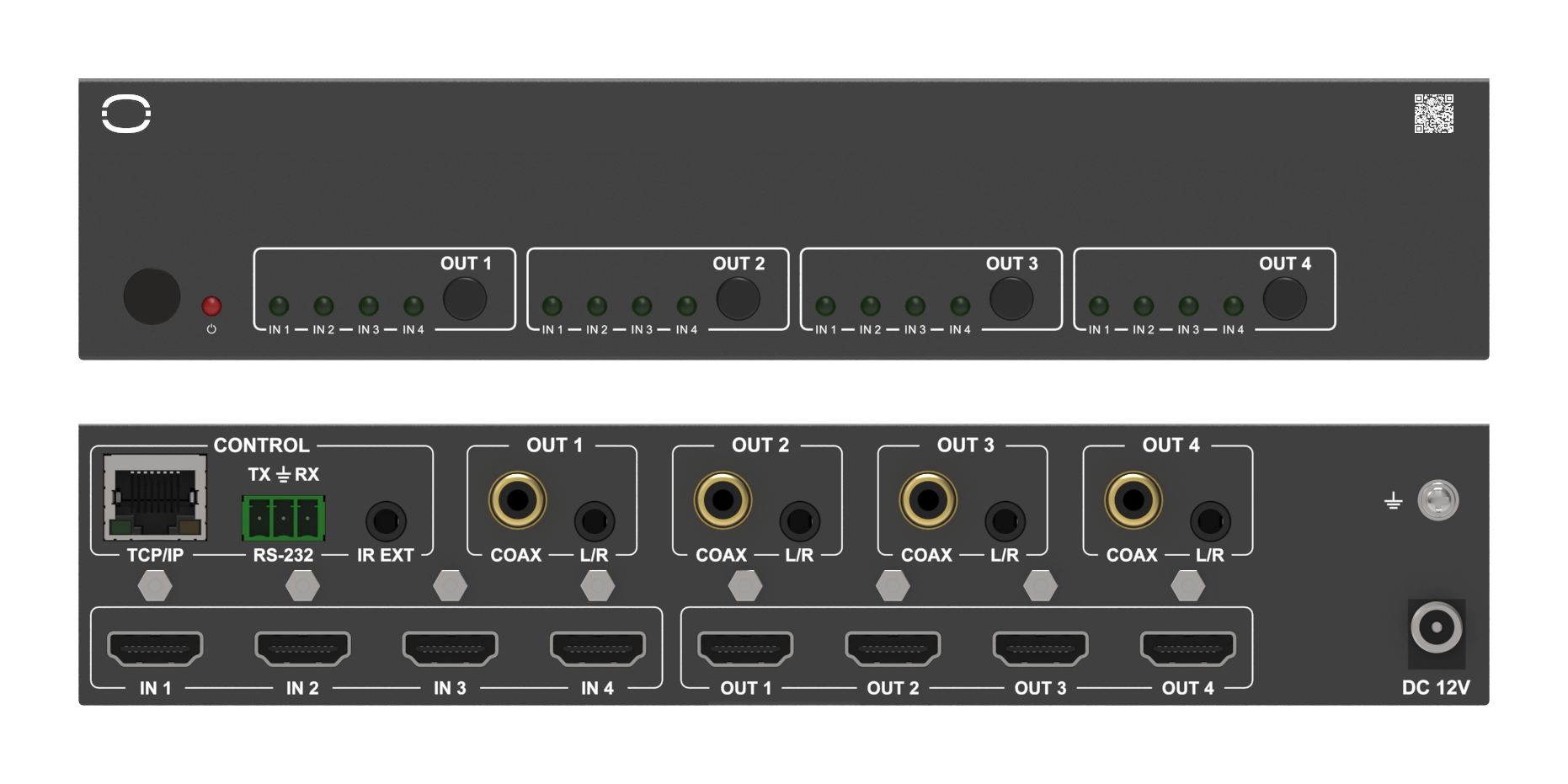
MMX-4X4AUD: 4×4 HDMI Matrix with Per-Output Scaling
A 4×4 HDMI 2.0 matrix that routes four sources to four displays and scales each output on its own from 4K down to 1080p.


 MMX-4X4-48G
48Gbps 4×4 HDMI 2.1 Matrix Switcher with Per-Output Downscaling & Audio Breakout
Full Gaming Feature Set - VRR, ALLM, QMS, QFT & SBTM to Every Output at 4K120 4:4:4
Product page →
MMX-4X4-48G
48Gbps 4×4 HDMI 2.1 Matrix Switcher with Per-Output Downscaling & Audio Breakout
Full Gaming Feature Set - VRR, ALLM, QMS, QFT & SBTM to Every Output at 4K120 4:4:4
Product page →
The MMX-4X4-48G is a 1U, all-metal 4×4 HDMI 2.1 matrix switcher that lets any of its four HDMI inputs be independently routed to any of its four HDMI outputs. It carries the full 48Gbps video bandwidth of HDMI 2.1, is HDCP 2.3 compliant, and adds per-output resolution downscaling and HDR conversion so a mix of new and legacy displays can share one routing fabric. It measures 17.32" × 7.99" × 1.75" (440 × 203 × 44.5mm), weighs 5.84 lbs (2.65kg), and runs on a locking DC 24V/2.7A adapter fed from AC 100–240V, 50/60Hz, drawing 35W maximum.
Video resolution is supported up to 8K60Hz 4:2:0, 8K30Hz 4:4:4, and 4K120Hz 4:4:4, all within the unit's 48Gbps of video bandwidth. It handles RGB 4:4:4, YCbCr 4:4:4, YCbCr 4:2:2, and YCbCr 4:2:0 color space at 8, 10, or 12-bit color depth. HDR, HDR10, HDR10+, Dolby Vision, and HLG all pass through, and each output can also convert HDR to SDR when the connected display needs it. The complete HDMI 2.1 gaming feature set — VRR, ALLM, QMS, QFT, and SBTM — is carried to every output.
Supported cable length depends on the signal. At 8K, use an Ultra High Speed HDMI 2.1 cable within 3m/9.8ft. At 4K60, cables are supported to 5m/16ft; at 4K30, to 10m/33ft; and at 1080P, to 15m/49ft. If an 8K source shows nothing while lower resolutions work, confirm the cable at 8K is within that 3m/9.8ft limit, or set the output's Video Mode to downscale 8K to 4K or 8K/4K to 1080P for a display that cannot accept 8K.
Yes. Because downscaling and HDR conversion run on each output port independently, one output can drive an 8K reference display while another downscales the same routed source for a legacy 4K or 1080p screen — no separate scaler in the rack. Advanced EDID management backs this up with 36 factory-defined EDID settings, 3 user-defined modes, and 4 copy-EDID modes, applied per input from the front panel, over RS-232, or through the Web GUI.
Each of the four outputs has its own audio breakout: an optical S/PDIF output (LPCM 2.0CH / Dolby / DTS 5.1CH) and a balanced analog output on a 5-pin 3.81mm phoenix connector (LPCM 2CH), for de-embedding to a processor or zone amp. Over HDMI in and out, formats include LPCM, Dolby Digital/Plus/EX, Dolby TrueHD, Dolby Atmos, DTS, DTS-EX, DTS-96/24, DTS High Res, DTS-HD Master Audio, and DSD. Control is available four ways: front-panel buttons, the supplied IR remote, RS-232 on a D-Sub 9 port, and a TCP/IP Web GUI over RJ45. Note that RS-232 and Web control become available a few minutes after power-on, once the unit finishes initializing.
KanexPro sells direct to dealers, resellers, installers and integrators, and through distribution. Whichever way you buy, the same engineers answer the phone.
The trade store: your own account, live stock, reordering, and a first look at new products.
Go to the trade store →Distribution and authorised resellers across the US and beyond.
See where to buy →Design help on extenders, matrix and AV over IP before you spec it.
Ask an engineer →