Comparing Different HDMI Standards
HDMI cable standards differ: High Speed is rated 10.2 Gbps, Premium High Speed 18 Gbps for 4K60, and Ultra High Speed 48 Gbps for 8K60 and 4K120.



HDMI can upgrade your television’s clarity, color, and high definition. But, what if your television doesn’t have an HDMI port? If you are not super tech-savvy, setting up new connections can be confusing and overwhelming. Audio-video equipment can be simple if you have the right resources. So, converting component to HDMI: Is it possible? Thankfully, there are a number of converters and other resources that can help you achieve all of your audio-visual needs.
If you are considering upgrading your home entertainment system, consider converting your analog devices to HDMI for a higher quality experience.
There are a number of different types of connectors depending on your audio-visual needs. They are most often divided into two categories, including analog and digital. Older devices and equipment often use analog signals. Comparatively, more modern electronics utilize digital. Both analog and digital signals have different types of connectors that allow each of them to function properly.
Analog signals often use one of two different connectors, including composite or component. Composite cables include one yellow, red, and white connector. The yellow connector is for video, while the red and white are for audio. Component cables also include red and white audio connectors. However, they divide the video into three components. One is for the brightness and the other two are for color information.
The good news about modern high-definition televisions is that they utilize HDMI (“high definition multimedia interface”) connectors. Digital signals provide a better user experience as they offer better sound, higher resolutions, and more clarity when it comes to color (as compared to composite and component analog).
If you want to upgrade to HDMI, it can be done without having to buy all new devices and equipment. Some converters can effectively transition your system from composite or component to HDMI. This can be done by converting the signal from your older device to work with your HDMI. One of the additional benefits beyond converting your analog to your HDMI is that it often also upgrades your resolution. The resolution can be upgraded to 720p or even full 1080 HD, depending on the capabilities of the converter.
If you are like many people who aren’t super tech-savvy, you may wonder, is my device analog or digital? Any device that uses composite or component signals will need a composite or component converter in order to be used with an HDMI television. Below you find some of the common analog devices so you know whether you need a converter.
If your device wasn’t listed above and you still don’t know whether it is analog or digital, you can examine their connection ports to confirm. Composite ports are yellow, red, and white. Component ports are green, blue, and red for video, and red and white for audio. Lastly, HDMI connectors consist of a single 19-pin port.
Before you buy a converter, it’s important to ensure it’s the right one for you. Determining if it will work with your connector type and how much it will improve the resolution are important. Instead of wondering if you are looking at the right product, contact the team at Kanex Pro. They are the top AV systems manufacturers and can help you upgrade your home theater system. Contact their team today for more information and waste no time getting started on your project!
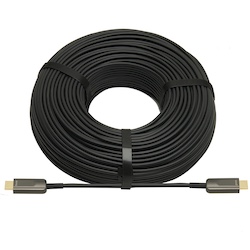
HDMI cable standards differ: High Speed is rated 10.2 Gbps, Premium High Speed 18 Gbps for 4K60, and Ultra High Speed 48 Gbps for 8K60 and 4K120.
HDMI cables have become the standard in many homes and offices over the last decade. They are helpful cables that transmit audio and video from…
HDMI cables are a necessary part of any tech setup at home or at work. They provide the clear and effective transmission of both audio and video…
KanexPro sells direct to dealers, resellers, installers and integrators, and through distribution. Whichever way you buy, the same engineers answer the phone.
The trade store: your own account, live stock, reordering, and a first look at new products.
Go to the trade store →Distribution and authorised resellers across the US and beyond.
See where to buy →Design help on extenders, matrix and AV over IP before you spec it.
Ask an engineer →